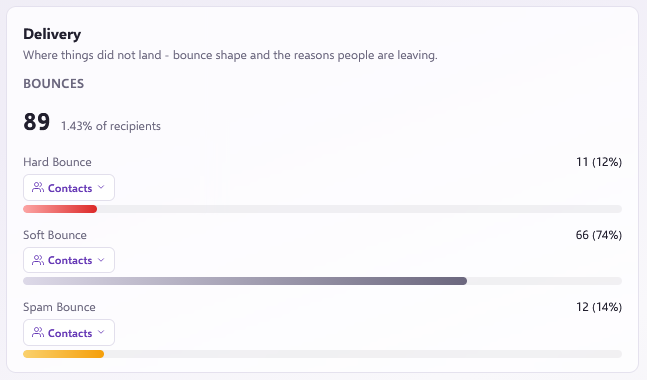
When an email cannot be delivered to a recipient, it bounces back. In the Force24 platform, we categorise bounces into three types:
- Hard Bounce: Indicates a permanent delivery failure, usually because the recipient address or domain does not exist. The platform automatically deactivates the email channel for contacts that hard bounce, protecting your sender reputation and deliverability.
- Soft Bounce: Indicates a temporary delivery issue, such as a full mailbox or temporary server downtime. As standard, Force24 automatically deactivates contacts who persistently soft bounce to protect your domain reputation.
- Spam Bounce: Occurs when the receiving email service provider (ESP) rejects the email on spam grounds. This is typically caused by content filters, explicit domain blocks, or low IP or domain reputation.
Deliverability support
Our deliverability team actively monitors the reputation of our IP addresses to improve inbox placement. If you need advice on improving your deliverability, email Force24 support at support@force24.co.uk which will open a support ticket for you.
Viewing campaign bounce reports
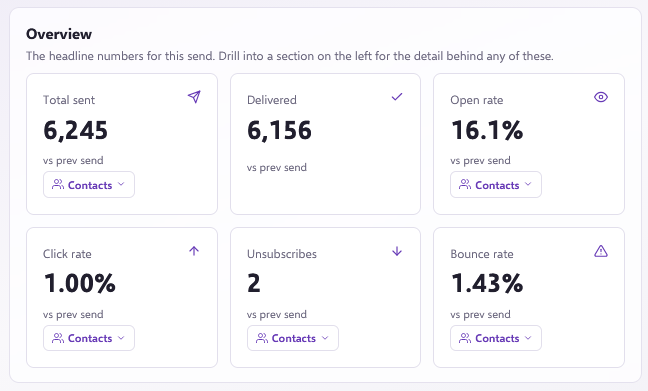
After sending a campaign, you can review detailed bounce reporting in the Overview and Delivery sections of your campaign reporting: