
High Value and Goal URLs let you tell Force24 which pages on your website matter most to you. This article explains how they affect Lead Scoring, and how to add, edit and remove them.
What are High Value and Goal URLs?
High Value and Goal URLs are linked to the Lead Scoring system in your Force24 account.
Lead Scores are applied to every contact to measure how engaged they are. Different activities, such as Email Opens, Email Clicks and Web Visits, are given different scores.
By default, a High Value URL is given a score of 10 and a Goal URL is given a score of 25. Contacts who click through to these URLs receive a higher Lead Score, so they are the contacts you would consider 'hot' leads.
You can choose which URLs on your site are High Value and which are Goal, so the lead scoring suits your business. For example, if you are a retailer, you might make your basket or checkout page a High Value URL, and the thank you page shown after a purchase your Goal URL.
Want to know more about Lead Scoring?
If you want to understand how Lead Scores are worked out, learn more in our Lead Scoring article.
How do I add or update my High Value and Goal URLs?
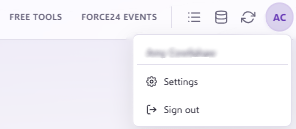
When you are logged in to your account, click Account Settings in the top right corner
- Navigate to Lead Scoring & Intelligence in Platform Settings
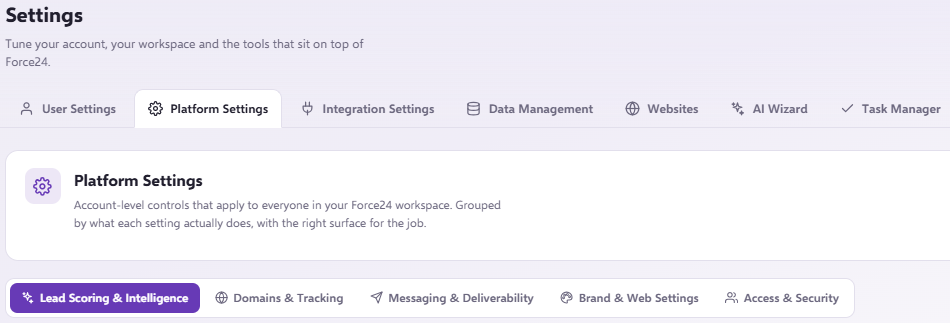
- Scroll down to see two sections, one for High Value URLs and one for Goal URLs.

- To add a URL, click the + icon on the right-hand side of the section you want, paste the URL into the box provided, then click Add on the right-hand side. The URL has now been added.

- To remove a URL, click the Delete button on the right-hand side of either section. If a URL needs updating, you can click Edit instead.

Where can I see activity on these URLs?
Your URLs are now used for lead scoring, and you can view them in the Web Insights tab of the platform.

Links with UTM or extra tracking
If your links include UTM or other tracking added to the end of the URL, add % to the end of your URL as a wildcard. This means any text following the link is ignored, and the click is still tracked as a Goal URL click.
Need a hand?
If you have any questions, reach out to us on live chat using the chat bubble at the bottom right of your Force24 platform. Our team is happy to help.