
Skip to content
Logo Help centre
Platform statusOpen Force24 Submit a ticket
Welcome
Login
Browse help topics
New Force24
NEW - Learning & Training NEW - Getting Started NEW - Email & SMS Campaigns NEW - Journeys & Automation NEW - Data, Segmentation & Contact Search NEW - Reporting & Analytics NEW - Websites, Forms & Landing Pages NEW - Deliverability & Compliance NEW - Integrations & APIs NEW - Account & Platform Settings NEW - Nexus, Custom Objects & More
Current Force24
Onboarding Email Builder Email/SMS Campaigns Journey Manager Apps In Journeys Managing your data Reporting Microsites Forms Pop Ups Deliverability Integrations Force24 AI Assistant Webinar Recordings How To Videos External Data SoAmpli
YOUR FORCE24 GUIDE
Help centre homeAll help articles
New Force24
NEW - Learning & Training NEW - Getting Started NEW - Email & SMS Campaigns NEW - Journeys & Automation NEW - Data, Segmentation & Contact Search NEW - Reporting & Analytics NEW - Websites, Forms & Landing Pages NEW - Deliverability & Compliance NEW - Integrations & APIs NEW - Account & Platform Settings NEW - Nexus, Custom Objects & More
Current Force24
Onboarding Email Builder Email/SMS Campaigns Journey Manager Apps In Journeys Managing your data Reporting Microsites Forms Pop Ups Deliverability Integrations Force24 AI Assistant Webinar Recordings How To Videos External Data SoAmpli
A little extra guidance?

Learn with a product expert.

Book training
How can we help?
  1. Force24 Support
  2. Solution home
  3. Email/SMS Campaigns
  4. SMS
Current Force24

How to change the 'From Name' in an SMS

Modified on: Thu, 28 May, 2026 at 5:05 PM

Customising an SMS Sender ID 


When creating an SMS campaign, you can customise the 'From Name' that appears in your contact's mobile inbox. This is known as your Sender ID.
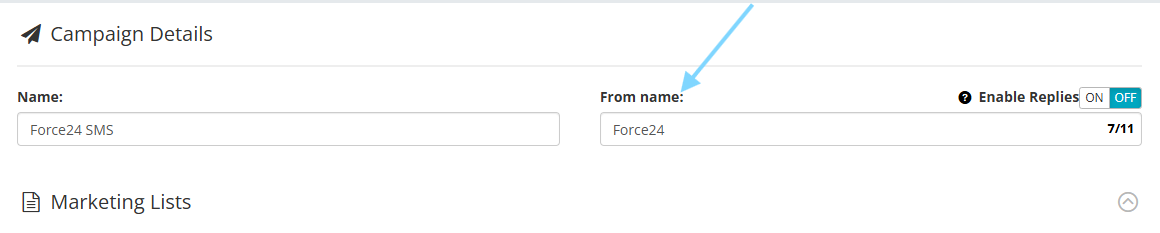


Rules for customising your Sender ID:

When you switch off replies to display a custom Sender ID, your chosen name must follow these global network rules:

  • Maximum of 11 characters

  • Alphanumeric characters only (letters and numbers)

  • No spaces or special characters (e.g., hyphens or punctuation)

Why the limit? This 11-character technical restriction has been a global telecom standard since the 1990s to ensure brand names fit cleanly onto any mobile screen size.


Need a hand? If you need any further assistance with creating or launching your SMS campaign, please reach out to the team via the platform chat bubble at the bottom right. 

Did you find it helpful? Yes No

Send feedback
Sorry we couldn't be helpful. Help us improve this article with your feedback.

On this page

Related Articles

    Force24 · Help for every next step.
    Platform statusPrivacyCookiesTerms
    Article views count