
How to use Nexus in journeys
Nexus can be used to make powerful automations that can deliver the right message to the right person at the right time. Using content that meets their bespoke criteria and is what they care about.
- In order to use Nexus within your Journey, simply, navigate to the Journey Builder page, and create a new journey.
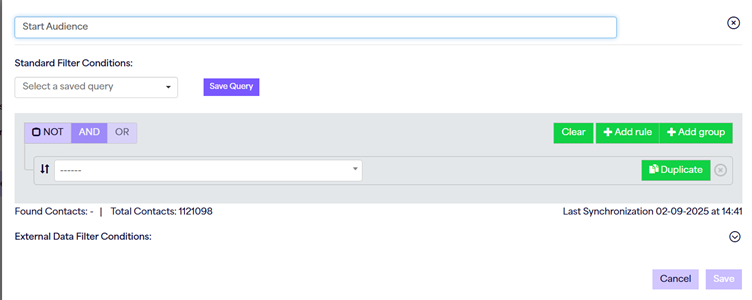
- Drag and drop a ‘start audience’ component into the editor, and you will see a new option that appears within. This is the ‘external data filter condition’. This filter decides what external data can be included within the journey (such as car types, holidays, newsletters etc). Whilst your standard filter conditions will need to be populated because this is contact specific, and will identify who from your data would qualify for the journey itself. That might be based on web activity, marketing list, or form additions for example.
- I can use the external data filter conditions in 2 ways. The first is by simply typing in a set criteria for example, ‘Make > Equals > Ford’ and this would make this journey specific to Ford cars. Alternatively, if I would like this to be more based on the contact themselves. Perhaps a form fill that has expressed interest in a specific make/model, or previous purchase history, I can match it to Contact Extension (CE field data), meaning that if there is a car in stock that matches the data we have held, that is what would be brought into the journey for the contacts.
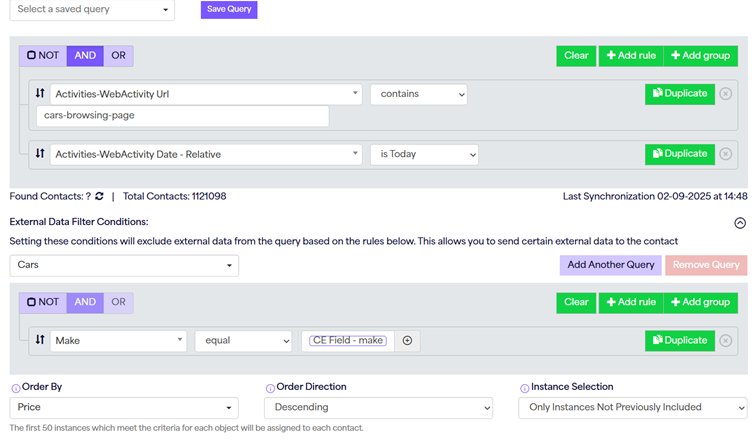
- There are ‘order by’ criteria set against a journey start audience. This is specific to the data that will be pulled into the journey; with a max capacity of 50 instances. So for example, if there are 100 instances in total, only 50 can be added to the journey. Of the 100 instances, which 50 should be prioritised for inclusion. This could be based on highest price for example.
- You can then build your journey as normal. Send email components have now got an option to choose templates with repeaters, or standard templates. SMS does not currently allow for external data usage.
If you wish to segment data further, you can use a Nexus decision component to do so, you can use multiple different instances within your Nexus decisions, however, the Nexus decision simply filters your existing data from the journey, and would not add any more at this point.