
The ‘contacts’ page and automated list conditions, has an AI feature enabled that allows you to simplify your workflow and speed up your efforts making queries.
To use the feature, you can simply ask for the contacts you’d like to be returned in the query with something as simple as ‘Contacts with a leadscore above 30 and are not in the marketing list ‘test list’’, or alternatively, click on the chips provided above the prompt box, to use premade queries with options to edit and adjust based on your needs.
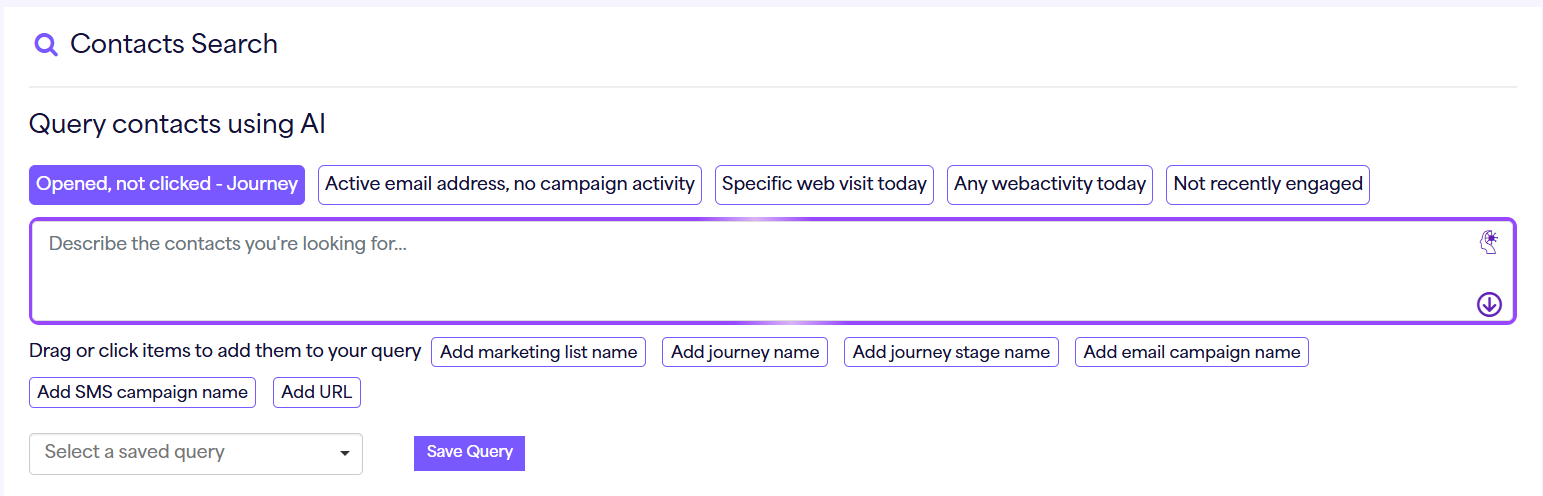
By selecting the premade chips along the top of the prompt box, it will prepopulate the area with the query, but some of these may need some further information before you press the arrow option to search your query.
For example, the option ‘opened, not clicked – journey’ will add the following prompt, but new chips have been added to the prompt box which will allow you to search for marketing lists and journeys that exist within your account, enabling you to quickly find these without having to memorise any of these details.

If you would like to add anymore of these searchable options to the query, simply use the options below the query which will add them to wherever your cursor is.
Once you are happy with the query, simply press the arrow, and AI will do the rest!