
When your data upload has finished, you may see some error records. This article explains what they mean and how to fix them.
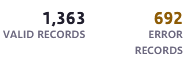
What are error records?
The number of error records is the number of contacts in your file that have not been uploaded to your Force24 account. This can happen for a few different reasons.
How do I find out why contacts have errored?
- Click Download errors under the error records to get an Excel sheet containing the error records.
- Open the file and look for the column titled errorreason or Error_Description. This gives the reason each contact errored.


What do the common error descriptions mean?

Duplicates
Duplicate in Source Data
This contact appeared more than once in your upload file. You don't need to fix this, as email address is the unique identifier for contacts in Force24 and the duplicates in the same file will be ignored.
Issues with emails or telephone numbers
Invalid or no email/telephone number provided
The email address in your file is not a valid email address matching the format something@example.thing. Check it, correct it and upload the contact again.

Field has invalid data
Invalid data for _ field
One of the contact fields you mapped during the upload does not match the data type it expects. For example, you may have mapped text data in your file to an integer contact field in Force24, as shown below.

This does need fixing. You can either create a new contact field with the right data type, or change the data in your file to match the field.
There's no email address
No Email/Telephone number provided
Force24 needs either an email address or a telephone number to create a contact. Add one to the row and upload the contact again.
Still need help?
If you have any questions, get in touch through the live chat in the bottom right corner of your Force24 platform. Our team will be happy to help.