
This article shows you how to build a new Segment so you can start adding contacts to it. Segments are groups of contacts that you can send to and report on together. They are different from Data Uploads, which are a record of the spreadsheets you've used to add contacts to your overall database in Force24.
Want contacts added automatically?
If you want a Segment to add and remove contacts for you, learn more in our Dynamic Segments article.
How do I create a new Segment?
Follow these steps to build a new Segment quickly:
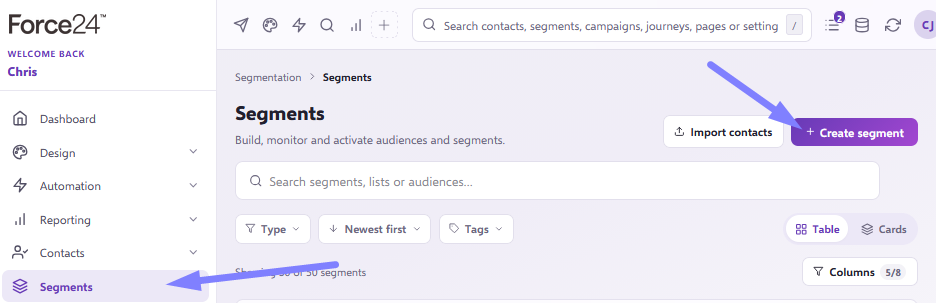
- Open the Segments section of the platform and click the Create Segment button.
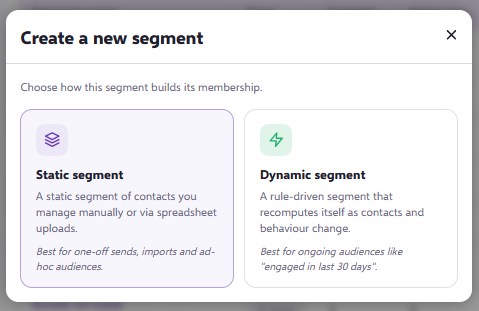
- Choose the type of Segment you want to create:
- Static Segment is a group of contacts without any automation.
- Dynamic Segment is a group of contacts that automatically adds and/or removes contacts for you.
You aren't locked in by this choice. You can make a Static Segment dynamic later, and the other way round.
- On the next screen, give your Segment a name. You can also add a description and tags if you want to. When you're happy with the name, click Create Segment.
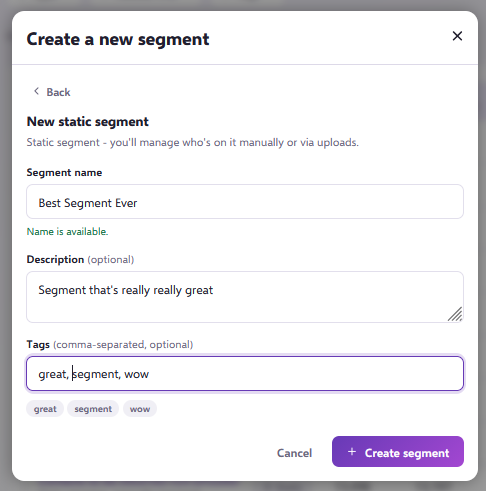
Naming your Segment
A Segment name doesn't need to be unique, but it helps to name it clearly after the people you plan to put in it. That makes it easy for you and your colleagues to see what each Segment is used for. For example, if a Segment is for new customers of product X, you could call it New customers X.
Once your Segment is created, you can start adding contacts to it.
Still need help?
If you have any questions, get in touch through the live chat in the bottom right corner of your Force24 platform. Our team will be happy to help.