
When you start sending with Force24, you will be sending from a brand new sending domain. Mailbox providers do not know your domain yet, so they treat your email with caution until you have proven that your contacts want it. This article explains how to build that trust gradually, through a process known as warming.
What does warm-up mean?
Warming up means gradually increasing your email volume over several weeks, so that mailbox providers can see you are a trustworthy sender. Mailbox providers look at the reputation of your sending domain as well as your IP address, so a new domain needs warming up in the same way as a new IP.
It typically takes 4 to 8 weeks to reach maximum deliverability, depending on your volume and engagement. It can take longer if mailbox providers do not believe your email is wanted, for example where recipients have not signed up explicitly. Some mailbox providers also limit the number of messages a new sender can deliver each day until they have built a positive reputation.
The more consistent you are with your volume, frequency, complaint levels and bounce levels, the faster you will build a positive sending reputation. If you send less often than weekly, it will take longer.
Why should I warm up my sending?
Your sending volume and the quality of your first sends play a huge part in the reputation you build at the start:
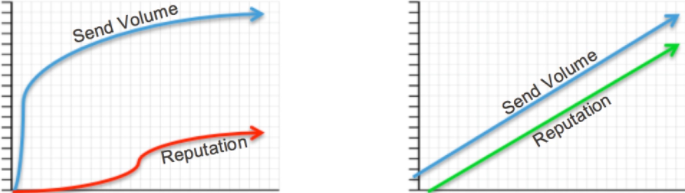
If you ramp up quickly, mailbox providers see sudden volume spikes from an unknown sender. This leads to blocks, filtering and rate limiting, none of which you want when you are just getting started.
If you ramp up slowly, mailbox providers see volume building gradually from a sender whose reputation is improving over time. This means far fewer blocks, filtering and rate limits, although these can still happen if complaint rates are high and engagement is low.
How does warming up improve my sender reputation?
Sender reputation is how mailbox providers view you and your email. It effectively controls your access to the inbox, so building and protecting a good reputation is critical to campaign success. With a poor reputation, your emails are more likely to land in Spam folders or be blocked outright.
Reputation can apply to your domain, your IP address, or both, and is based on:
- Spam complaints
- Spam trap hits
- Invalid email addresses (hard bounces)
- Authentication (SPF, DKIM and DMARC)
- Third-party blacklisting
- Engagement
What helps your reputation
- Opens
- Clicks
- Correctly set up authentication
- Consistent sending patterns
What harms your reputation
- Poor or insufficient permission
- High recipient complaints (reported as spam)
- IP address and domain blacklisting
- Poor data quality and hygiene
- Bad email addresses
- Spam trap hits
- Large spikes in volume
Authentication and complaint rates
Major mailbox providers such as Google, Yahoo and Microsoft now expect bulk senders to authenticate their email with SPF, DKIM and DMARC, and to keep spam complaint rates very low. Make sure your authentication is set up before your first campaign, as email that fails these checks can be rejected or sent to Spam however carefully you warm up.
What should my warm-up plan look like?
Your daily send volume should start as small as possible, depending on the size of your initial audience, and increase a little every week. It is important that volumes rise steadily and methodically so that you do not raise any red flags with mailbox providers.
When you begin, we strongly recommend sending your best performing messages, and sending them only to your most engaged contacts. Add in your older Segments as you progress, gradually increasing the proportion of less engaged recipients over time. The aim is to send to the people least likely to complain or bounce, which means those who opted in most recently and who open and click consistently.
Opens and clicks are the engagement signals that mailbox providers use to judge whether your email is wanted, so they are the best guide to who you should send to first. Here we are talking about engagement for the purposes of deliverability, rather than whether a contact is likely to buy.
- Weeks 1 and 2: send to your most active contacts, those who have opened or clicked in the past 30 days.
- Weeks 3 and 4: expand to contacts who have opened or clicked in the past 60 days.
- Throughout the first 6 weeks: do not send to contacts who have not opened or clicked in the past 90 days.
Your initial sending volume will depend heavily on your industry, audience size and other factors, so treat the timings above as a guide rather than a fixed schedule.
Need to build engagement Segments?
If you want to build Dynamic Segments to pick out your most engaged contacts, learn more in our Dynamic Segments article.
How can Data Validation help?
As well as prioritising your most engaged contacts, you can run your contacts through our Data Validation tool before your first campaign. It checks your data and filters out invalid or high risk email addresses that could damage your sending reputation if you sent to them from a brand new domain.
Want to know more about Data Validation?
To find out how it works in Journeys, read our Apps in Journeys: Data Validation article.
Need tailored advice?
If you would like more advice on warming up and sending your first Force24 campaigns, reach out to our support team on the live chat, or speak to your Force24 Account Manager for expert guidance.