
This article covers some useful tips for writing your SMS messages, including special characters, placeholders, opt-out links and message length.
Why should I avoid special characters?
SMS messages don't support most special characters. For example, avoid using apostrophes, as they can cause delivery issues or be replaced with unexpected characters on your recipients' devices.
Want to know more about special characters?
To find out which special characters can cause problems and why, read our What are special characters and what problems can they cause? article.
How do I personalise my messages with placeholders?
You can personalise your SMS messages by adding placeholders. These insert contact-specific details when the message is sent. There are two main types:
- Text Placeholders (Personalisations): insert contact data, for example
[FirstName]. - URL Placeholders: insert trackable URLs, for example
[url=http://example.com].
The system automatically replaces these placeholders with the relevant data, or with a shortened tracked link such as http://sm5.co/XXXXX.
Don't use a link shortener
When you add a link inside the [URL=] component, it is shortened automatically. Using a separate link shortener within this tool may stop the URL working as expected.
How do I add an opt-out link?
To help your contacts unsubscribe easily, you can add an opt-out link in two ways:
- Automatically included opt-out link: this is the default.
- Manually added opt-out placeholder: use
[OptOut]or<OptOut>in your message text.
For example, "Stop [OptOut]" becomes "Stop http://sm5.co/XXXXX".
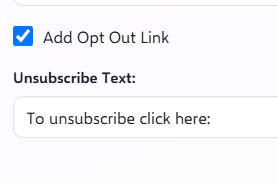
You can also add an opt-out link quickly by clicking the Add Opt Out Link button in the SMS editor toolbar:
Can I rent a dedicated opt-out word?
For more advanced SMS compliance, you can rent a unique opt-out word, for example "STOPNOW". This lets your recipients unsubscribe by replying with that word. Things to know:
- The word is unique to your account.
- To discuss renting a word, speak to your Account Manager.
- If you stop renting the word, you risk losing ownership of it and may need to rent a new one.
How does the message preview work?
The SMS editor preview shows an estimated final message length and replaces your placeholders with sample data.
Keep in mind
Your contacts' actual data can vary in length, which may change the final message size and cost.
What is the maximum length of an SMS message?
The maximum length of a single SMS message is 160 characters. If your message is longer, it will be sent as multiple messages, which use more credits.
Want to know more about technical limits?
For more on character counts, technical limits and input warnings, read our SMS Technical Guidance article.