
Under UK GDPR, you must afford your contacts the right to erasure. This means you are required to delete the personal information held against a contact upon request.
If you are a designated Master User of your account, you can perform this task directly in the portal.
Difference between Erase and Delete
Delete removes the contact from your Force24 database, but allows them to be re-uploaded in future. Erase permanently deletes all personal data and prevents the contact from ever being re-uploaded or recreated.
Warning
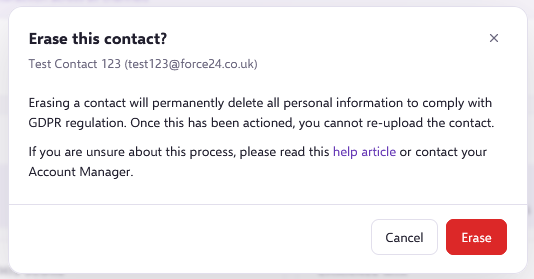
Erasing a contact will permanently delete their information. You will not be able to upload or recreate the same contact information again.
How to erase a contact
- Find the contact you wish to erase and open their contact record.
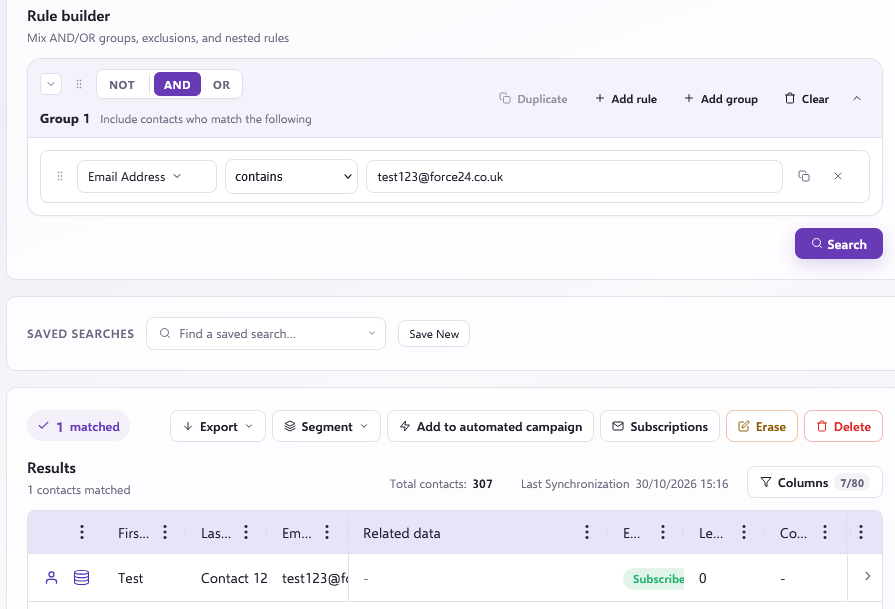

- At the top of their contact page, click Erase (or choose Delete if you only wish to remove the contact without preventing future uploads).

- A pop-up warning box will appear. Click Erase to proceed.
- A second confirmation pop-up window will appear. Click Erase to confirm the erasure.
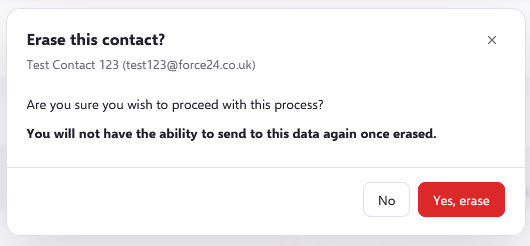
Once confirmed, the contact information will be marked for erasure and a status notification will appear at the bottom right: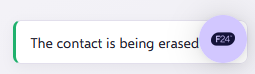
The contact's erasure will start processing, which can take up to 15 minutes to complete.
What happens after erasure?
The erasure process deletes all personal data relating to the contact and prevents their email address and telephone number from being re-uploaded to the platform.
How re-uploads are prevented
A cryptographically hashed copy of the contact's email address is stored securely to ensure you do not accidentally re-upload or recreate this contact in future.