
Activities refer to actions that have taken place in the Force24 platform, such as a contact clicking an email, bouncing, or unsubscribing. Below is a guide to the activity queries available when building filters or rules.
Common
- Bounced SMS campaign:
Searches for contacts based on whether they have bounced from an SMS campaign. This is followed by a 'Yes' or 'No' option. - Bounced SMS campaign Date:
Searches for contacts that have bounced from an SMS campaign on a specific calendar date. - Bounced SMS campaign Date – Relative:
Searches for contacts that have bounced from an SMS campaign relative to the current day. You will need to add extra date criteria to complete the query. For example: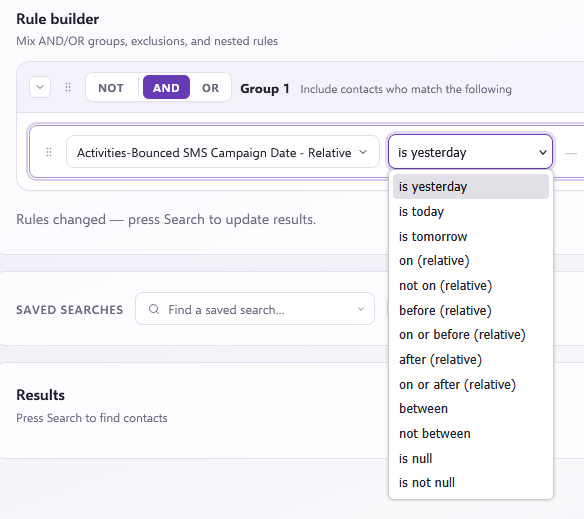
- Campaign WebActivity:
Searches for contacts that received a campaign and carried out web activity relating to it. You will need to specify the campaign name. For example:
This query shows every contact that has had web activity with the 'Email 1' campaign.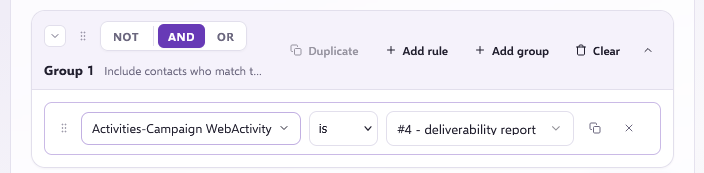
- Clicked Email Campaign:
Searches for contacts that have clicked on a specific email campaign. - Clicked Email Campaign Date:
Searches for contacts that have clicked on a specific email on an inputted date. For example: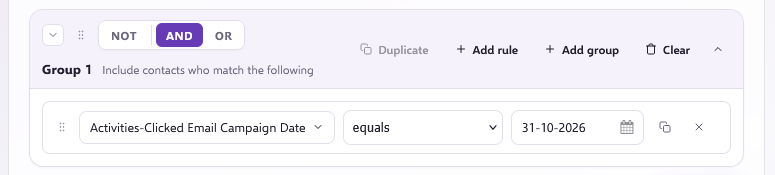
It can also be after, on or before, or between two dates, or many others: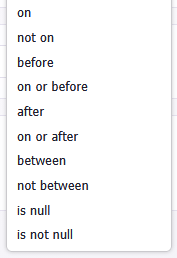
- Clicked Email Campaign Date – Relative:
Searches for contacts that have clicked on a specific email on a date relative to the current day. Relative dates are those that are rolling and in relation to today, rather than a fixed point in time, such as 'yesterday' which will be a different date tomorrow than it is today. - Clicked Email Campaign Name:
Finds a specific email campaign by name and checks which contacts clicked on it. - Clicked Email URL:
Searches for contacts who clicked on a specific URL from an email campaign. For example: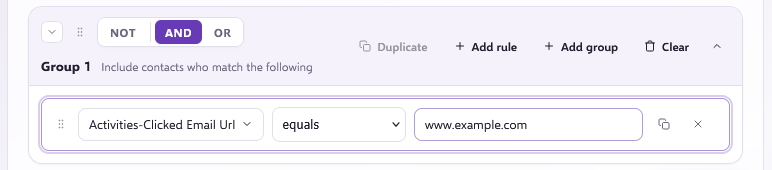
- Clicked SMS Campaign:
Searches for contacts that have clicked on a specific SMS campaign. - Clicked SMS Campaign Name:
Finds a specific SMS campaign by name and checks which contacts clicked on the SMS. - Clicked SMS Date:
Searches for contacts that have clicked on a specific SMS campaign on an inputted date. - Clicked SMS Date – Relative:
Searches for contacts that have clicked on a specific SMS on dates relative to the current day. - Clicked SMS URL:
Searches for contacts who clicked on a specific URL from an SMS campaign. - Hard Bounced Email Campaign:
Searches for contacts based on whether they have hard bounced from an email campaign ('Yes' or 'No'). - Hard Bounced Email Campaign Date:
Searches for contacts that have hard bounced from an email campaign on a specific date. - Hard Bounced Email Campaign Date – Relative:
Searches for contacts that have hard bounced from an email campaign on dates relative to the current day. - Hard Bounced Email Campaign Name:
Searches for contacts that have hard bounced from a specific email campaign name. - Hard Bounced SMS Campaign Name:
Searches for contacts that have hard bounced from a specific SMS campaign name. - Has WebActivity:
Utilises the tracking script to search for contacts who have visited your website and carried out activity. - Open Email Campaign:
Searches for contacts who have opened an email campaign generally. - Open Email Campaign Date:
Searches for contacts that have opened an email campaign on a specific date, followed by a 'Yes' or 'No' component. - Open Email Campaign Date – Relative:
Searches for contacts that have opened an email campaign on dates relative to the current day. - Opened Email Campaign Name:
Searches for contacts that have opened a specific email campaign specified by name. - Replied SMS Campaign Name:
Searches for contacts that have replied to a specific SMS campaign name. - Replied to SMS Campaign:
Searches for contacts that have replied to an SMS campaign generally. - Reply Date:
Searches for contacts that have replied to an SMS campaign on a specific date (inputted in DD-MM-YYYY format). - Reply Date – Relative:
Searches for contacts that have replied to an SMS campaign on dates relative to the current day. - Reply Message:
Searches for contacts that have replied to an SMS campaign containing a specific word, phrase, or message. - Soft Bounced Email Campaign:
Searches for contacts based on whether they have soft bounced from an email campaign ('Yes' or 'No'). - Soft Bounced Email Campaign Date:
Searches for contacts that have soft bounced from an email campaign on a specific date. - Soft Bounced Email Campaign Date – Relative:
Searches for contacts that have soft bounced from an email campaign on dates relative to the current day. - Soft Bounced Email Campaign Name:
Searches for contacts that have soft bounced from a specific email campaign name. - Spam Bounced Email Campaign:
Searches for contacts based on whether they have spam bounced from an email campaign ('Yes' or 'No'). - Spam Bounced Email Campaign Date:
Searches for contacts that have spam bounced from an email campaign on a specific date. - Spam Bounced Email Campaign Date – Relative:
Searches for contacts that have spam bounced from an email campaign on dates relative to the current day. - Spam Bounced Email Campaign Name:
Searches for contacts that have spam bounced from a specific email campaign name. - Unsubscribed From Email Campaign:
Searches for contacts that have unsubscribed from any email campaign ('Yes' or 'No'). - Unsubscribed From Email Campaign Date:
Searches for contacts that have unsubscribed from a campaign on an inputted date. - Unsubscribed From Email Campaign Date – Relative:
Searches for contacts that have unsubscribed from a campaign on dates relative to the current day. - Unsubscribed From Email Campaign Name:
Searches for contacts that have unsubscribed from a specific email campaign specified by name. - Unsubscribed From SMS Campaign:
Searches for contacts that have unsubscribed from any SMS campaign. - Unsubscribed From SMS Campaign Date:
Searches for contacts that have unsubscribed from an SMS campaign on a specific date. - Unsubscribed From SMS Campaign Date – Relative:
Searches for contacts that have unsubscribed from an SMS campaign on dates relative to the current day. - Unsubscribed From SMS Campaign Name:
Searches for contacts that have unsubscribed from a specific SMS campaign specified by name. - WebActivity Date:
Searches for contacts that have had any web activity on a specific date. - WebActivity Date – Relative:
Searches for contacts that have had any web activity on dates relative to the current day. - WebActivity Is Goal:
Searches for contacts who have visited a tracked goal URL page and carried out activity on it. - WebActivity High Value:
Searches for contacts who have visited a tracked high-value URL page and carried out activity on it. - WebActivity Referrer:
Searches for contacts referred to a webpage. You insert the referrer URL to see who was referred there. - WebActivity URL:
Searches for contacts that have landed on a tracked web page using the URL.
Operator components
There are additional components you will need to use alongside your query to specify criteria, such as: equal, not equal, begins with, contains, doesn't contain, is empty, is not empty, less, less or equal, greater, greater or equal, between, and not between.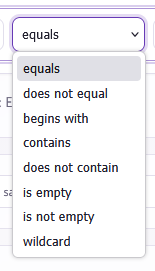
- 'equal': Used to search for contacts matching exact data input. For example, selecting "Email Address", choosing "equal", and entering an exact email address stored in the system.
- 'does not equal': Used to search for all contacts excluding the specific data input.
- 'begins with': Used to search for information starting with your inputted value. For example:This searches for all contacts with email addresses beginning with 'ex'.
- 'contains': Used to search for contacts whose data includes your inputted term. For example:This searches for contacts with email addresses containing "example". This is useful when you are unsure of the exact address.
- 'does not contain': Works in reverse of 'contains', searching for all contacts except those containing the specified term. It searches for contacts with anything in that field except the specified term. If you're looking to exclude something from the query instead, it's better to use a NOT group with positive rules in it.
- 'is/yes': Searches for contacts that are a certain thing or have a certain quality.
- 'is not/no': Searches for contacts that are anything but a certain thing or have anything except a certain quality. If you're looking to exclude something from the query instead, it's better to use a NOT group with positive rules in it.
- 'is empty': Searches for contacts with an empty data field for the selected category.
- 'is not empty': Searches for all contacts with a populated data field for the selected category. For example: A good example for this is searching for contacts without an empty email field (which will show all contacts, as every contact in the system has an email address).
- 'less': Used on a date or time basis to find contacts who took an action prior to a specified point.
- 'less or equal': Works similarly to 'less', but brings results that are before and including the specified date.
- 'greater': The reverse of 'less', used to find information after a specified date or time, excluding the input date.
- 'greater or equal': Used to find contact data from a certain date or time onwards, including the specified date.
- 'between': Used on a date or time basis to find contacts within a specific window between two dates.
- 'not between': The reverse of 'between', used to find contacts outside of a specified date range.
Other search queries
Besides activities, there are many other data fields you can search for in the system:
- Address 1 & Address 2: Used to search fields relating to a contact's address details. This includes specifiers for City, Country, County, Fax, Line 1, Line 2, Line 3, Post Code, Telephone 1, Telephone 2, and Telephone 3 (with additional spare fields available under Address 2).
- Aux Fields: Custom fields used to store data, with 10 available Aux fields for searching.
- Aux Dates + Relative: Used to search custom dates (formatted as DD-MM-YYYY). Aux date relative fields allow you to search dates relative to the current day. There are 5 date fields and 5 relative date fields.
- Aux Date Time + Relative: Used to search custom date and time data (formatted as DD-MM-YYYY HH:mm:ss). Relative variants allow searches based on dates and times relative to today. There are 3 date time fields and 3 relative date time fields.
- Birth Date: Searches for specific contact birth dates (formatted as DD-MM-YYYY).
- BirthDay – Relative: Searches for contact birthdays relative to the current day.
- Campaign – Channel: Used to search for campaigns that are either emails or SMS messages.
- Campaign – Has Received Any: Searches for contacts based on whether they have received any campaigns or not.
- Campaign – Received Campaign Date: Searches for contacts that received a campaign on a specific date.
- Campaign – Received Campaign Date – Relative: Searches for contacts that received a campaign on dates relative to the current day.
- Campaign – Received Campaign Name: Searches for contacts that received a specific campaign specified by name.
- Company Name: Searches for contacts with data in the company name field (you will need to specify the company name).
- Contact ID: Searches for specific contacts through their unique contact ID.
- Created On: Searches for contacts added to the system on a specific date.
- Created On – Relative: Searches for contacts added to the system on dates relative to the current day. For example:
This searches for contacts added 'yesterday', which automatically adjusts based on the relative date.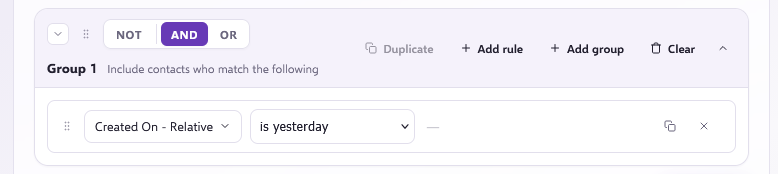
- Email Address: Searches for contacts through their email address (includes Email Address 2 and 3 spare fields).
- Fax: Searches for contacts through their fax details.
- First Name: Searches for contacts by first name (note that this returns all contacts sharing the same first name).
- Format Optimized Phone Number: Searches using the last 8 digits of a phone number (without spaces, prefixes, or parentheses), used internally for approximate phone number deduplication.
- Has Valid Phone Number: Searches for all contacts with a valid phone number.
- Import Key: Searches for contacts linked to a specific import key.
- Is Deleted: Searches for contacts that have been deleted.
- Is Form Capture: Searches for contacts added to the system via a Form Builder form capture.
- Job Title: Searches for contacts sharing a specified job title.
- Last Name: Searches for contacts by last name (returns all contacts sharing the same last name).
- Lead Score: Searches for contacts by their lead score.
- Manager Name: Searches for contacts by their manager's name.
- Manager Phone: Searches for contacts by their manager's phone number.
- Segments: Searches for contacts in a specific Segment.
- Segments – Is In Any: Searches for contacts that are in any Segment, or contacts not in any Segment.
- Segments Date Added (UTC): Searches for contacts added to any Segment on a specific date and time.
- Segments Date Added (UTC) - Relative: Searches for contacts added to any Segment on a day or range relative to today's date (e.g. today, yesterday, 30 days ago). These Segment queries can be combined to check if a contact was added to a specific list within a specific timeframe.
- Middle Name: Searches for contacts by middle name.
- Modified On: Searches for contacts whose personal details were modified on a specific date.
- Modified On - Relative: Searches for contacts whose personal details were modified on a date relative to today.
- Person Id: Identifies or searches for contacts by their Person ID. This remains constant even if a contact gets overwritten, helping find original information.
- Phone Number: Searches for contacts by their phone number.
- Salutation: Searches for contacts by salutation. Salutations can be added upon upload or updated via the contact profile.
- Status – Direct Mail: Searches contact statuses for Direct Mail (Active, Unsubscribed, Bounce, or Inactive).
- Status – Email: Searches contact statuses for Email (Active, Unsubscribed, Bounce, or Inactive).
- Status – Global: Searches overall contact status (Active or Inactive).
- Status – SMS: Searches contact statuses for SMS (Active, Unsubscribed, Bounce, or Inactive).
- Subscription Preference: Searches for contacts that have subscribed or unsubscribed from a specific campaign.
Journey Stage
- Date Added: Searches for contacts added to a stage for any journey on a specific date (DD-MM-YYYY format).
- Date Added - Relative: Searches for contacts added to a journey stage on a date relative to today.
- Date Completed: Searches for contacts who completed any journey stage on a specific date (DD-MM-YYYY format).
- Date Completed – Relative: Searches for contacts who completed any journey stage on a date relative to today.
- Name: Searches for contacts at specific journey stages, or can be inverted using the 'is not' component to look at contacts at every other stage.
- Status: Searches for contacts by status within a journey ('active', 'completed', 'delayed', 'queued', or 'skipped').
Journey
- Date Added: Searches for contacts added to any journey on a specific date (DD-MM-YYYY format).
- Date Added - Relative: Searches for contacts added to any journey on a date relative to today.
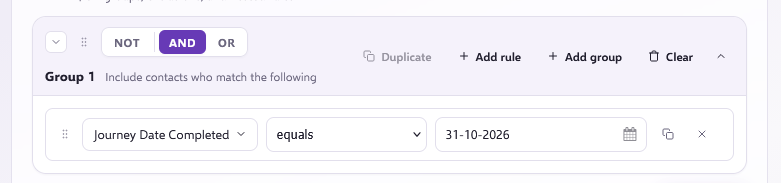
- Date Completed: Searches for contacts who completed any journey on a specified date. For example:
- Date Completed – Relative: Searches for contacts who completed a journey on dates relative to today.
- Name: Searches for contacts currently in a specific journey.
- Status: Searches for contacts by their status within a journey (such as 'completed' or 'active').
Journey Activities
- Email Click Journey Name: Searches for contacts that have clicked on an email within a journey (requires entering the journey name).
- Email Hard Bounce Journey Name: Searches for contacts that have hard bounced from an email within a journey (requires entering the journey name).
- Email Open Journey Name: Searches for contacts that have opened any email within a journey (requires entering the journey name).
- Email Received Journey Name: Searches for contacts that have received an email within a journey (requires entering the journey name).
- Email Soft Bounce Journey Name: Searches for contacts that have soft bounced from an email within a journey (requires entering the journey name).
- Email Spam Bounce Journey Name: Searches for contacts that have spam bounced from an email within a journey (requires entering the journey name).
- Email Unsubscribe Journey Name: Searches for contacts that have unsubscribed from any email within a journey (requires entering the journey name).
- SMS Click Journey Name: Searches for contacts that have clicked on a link in an SMS within a journey (requires entering the journey name).
- SMS Hard Bounce Journey Name: Searches for contacts that have hard bounced from an SMS within a journey (requires entering the journey name).
- SMS Received Journey Name: Searches for contacts that have received an SMS within a journey (requires entering the journey name).
- SMS Reply Journey Name: Searches for contacts that have replied to an SMS within a journey (requires entering the journey name).
- SMS Unsubscribe Journey Name: Searches for contacts that have unsubscribed from an SMS within a journey.
- WebActivity Journey Name: Searches for contacts who are part of a specific journey and have carried out web activity relating to campaigns within that journey.
Journey Stage Activities
- Email Click Stage Name: Searches for contacts that have clicked on an email campaign from a stage in a journey. This is often used in Make Decision stages to search for contacts who clicked the first email in a journey.
- Email Hard Bounce Stage Name: Searches for contacts that have hard bounced from an email at a specific stage in a journey (requires selecting the exact stage).
- Email Open Stage Name: Searches for unique email opens at a specific send email stage in a journey.
- Email Received Stage Name: Searches for contacts that have received an email from a specific stage in a journey.
- Email Soft Bounce Stage Name: Searches for contacts that have soft bounced from an email at a specific stage in a journey.
- Email Spam Bounce Stage Name: Searches for contacts that have spam bounced from an email at a specific stage in a journey.
- Email Unsubscribe Stage Name: Searches for contacts that have unsubscribed from an email at a specific stage in a journey.
- SMS Click Stage Name: Searches for contacts that have clicked on an SMS campaign from a specific stage in a journey.
- SMS Hard Bounce Stage Name: Searches for contacts that have hard bounced from an SMS campaign at a specific stage in a journey.
- SMS Received Stage Name: Searches for contacts that have received an SMS from a specific stage in a journey.
- SMS Reply Stage Name: Searches for contacts that have replied to an SMS campaign at a certain stage in a journey.
- SMS Unsubscribe Stage Name: Searches for contacts that have unsubscribed from an SMS at a specific stage in a journey.
- WebActivity Email Stage Name: Searches for contacts at a send email stage within a journey who received the email campaign and carried out web activity relating to that specific campaign.
Need further assistance?
If you have any questions, email Force24 support at support@force24.co.uk which will open a support ticket for you, or reach out through the live chat function in the bottom right of your platform.