
It is very easy to search for the presence of an action, but sometimes determining the logic when searching for the absence of a particular action or contact attribute across multiple parameters at the same time can be tricky.
Introducing NOT, or group exclusion. The NOT function allows you to choose a group of rules to exclude, making it easy to look for contacts who have some criteria of your choosing and also don't have other criteria of your choosing.
Excluding contacts who have done a specific activity using NOT
Let's say we want to look for contacts who were in a certain Segment but didn't click a given URL in a given campaign.
An entire group can be negated simply by checking the NOT checkbox next to the group that you'd like to exclude:
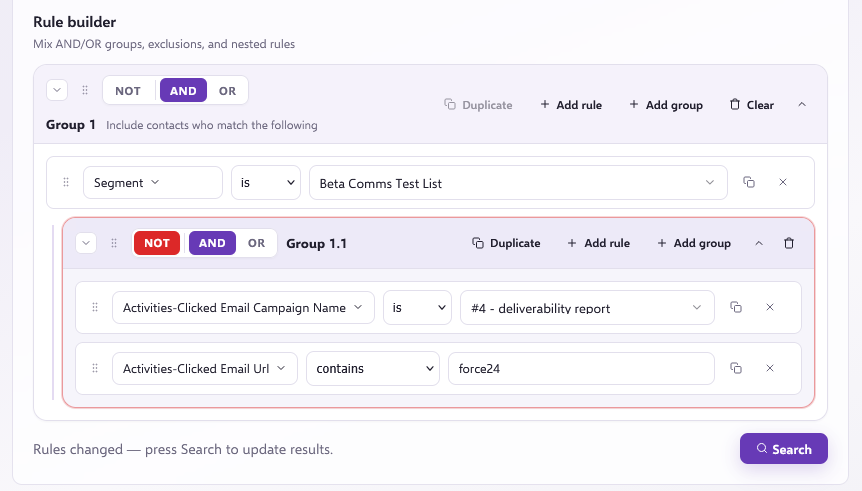
This setup looks for all the contacts in that segment, and then excludes those in that segment who clicked that link in that campaign, making it easy to see who hasn't clicked.
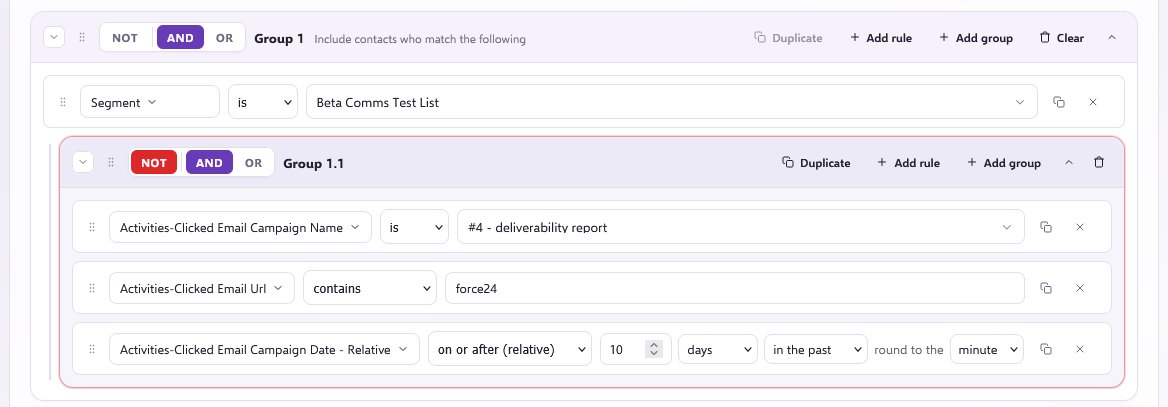
Group negation is especially helpful when trying to find contacts who have not done something within a specific period of time.
The example below shows a query that returns all contacts from the Segment who have not clicked a URL containing "Force24" within the specified campaign in the past 10 days:
Need further assistance?
If you have any questions, email Force24 support at support@force24.co.uk which will open a support ticket for you, or reach out through the live chat function in the bottom right of your platform.