
When viewing the Contacts page, you will see several tabs and status options. Each one represents how a contact can receive, or not receive, communications. This article explains each status.
What are the Active and Inactive contact statuses?
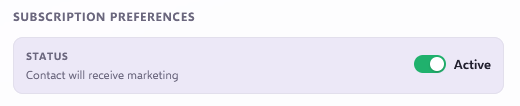
Active Contact (Global)
An active contact is someone who is a contact in Force24 and has not been deactivated.
Inactive Contact (Global)
An inactive contact is someone whose status has been manually set to "Inactive". This acts as a master on/off switch for all communications. While a contact is inactive:
- They will not receive any content.
- This includes both marketing and transactional messages.
- This applies even if they are otherwise subscribed.
Inactive contacts receive nothing
No communications will be sent until the contact is set back to active.
What are the email statuses?
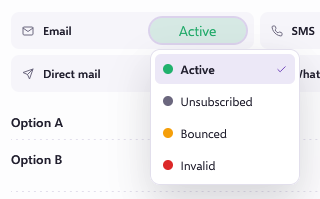
Active
An active contact is someone who has a valid email address and is able to receive email communications.
Unsubscribed
A contact is marked as "Unsubscribed" when they choose to opt out of marketing communications. This usually happens when they:
- Submit a preference form.
- Click an unsubscribe link in an email.
When a contact is unsubscribed:
- They will no longer receive marketing emails.
- They can still receive transactional communications, such as order confirmations, account updates or service alerts.
Transactional messages need an active contact
An unsubscribed contact can only receive transactional communications if their Active/Inactive (master on/off) status is set to active.
Bounced
A contact will be marked as bounced if they hard bounce, or if they spam bounce or soft bounce a few times. Once a contact is marked as bounced:
- Future delivery attempts will not succeed.
- It is recommended to stop sending to these addresses.
This helps maintain good deliverability and overall data health.
What are the SMS and WhatsApp statuses?
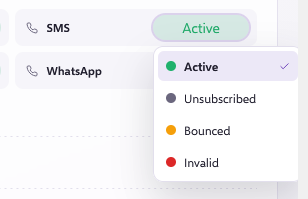
Active
An active SMS or WhatsApp contact has a valid phone number and can receive both marketing and transactional messages.
Unsubscribed
An SMS or WhatsApp contact is marked as "Unsubscribed" when they opt out of marketing messages. When this happens:
- They will no longer receive marketing SMS messages.
- They can still receive transactional messages, such as order confirmations.
Invalid
An SMS or WhatsApp contact is marked as "Invalid" when their number is not valid. You can find the details of what counts as valid in our SMS Pricing and Sending SMS Internationally article.
What does the Custom status mean?
A "Custom" status usually indicates a status that does not match the standard categories in the platform.
In most cases, this means the contact is set to not receive email and/or SMS.