
So your journey is live and you see a number in either the active, enrolled or completed stage or in all fields here like below.
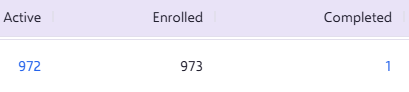
The active count is currently telling you how many contacts are currently still going through the journey, this can be at a particular 'stage' within the journey. Stages are the steps you have added in within your journey so, for example, 'Start Audience' linked to a 'Delay Component' can be stage 1. 'Delay component' linked to 'Send Email' can be stage 2 in the journey, and so on.
For example, if we look at the below we can see 432 in the active count, 44.4% in the completed count and a completion count of 55.6%.
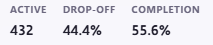
This is showing on this particular stage we have 2 that are currently active = going through the journey
From this 55.6% have completed this stage of the journey and will be moving onto the next stage.
We can also see that 44.4% of contacts have dropped-off on this stage.
You will see that the active count number will continuously change depending on where contacts are and which stage they are going through. This will also change depending on the throttling you have set in place, so the number here could look higher than you last checked this.
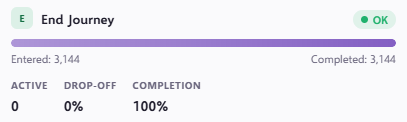
If we take a look at the total count of 3144 at the end of the journey, this is the total number of contacts that have completed the full journey.
If you have any questions, feel free to reach out to us through the live chat function available bottom right in your Force24 Platform. Our team is ready to assist you and provide support whenever you need it.