
As part of your Force24 package, you have a maximum number of active contacts that can be used in your account. Any overages are chargeable, so it's important to stay on top of your total number of active contacts and keep it below your allowance. This article explains how your active contacts are counted and how to reduce them if you're nearing or over your limit.
Overages are chargeable
If your active contacts go over your allowance, the extra contacts will be charged. Check your total regularly so it doesn't catch you out.
How are my active contacts counted?
When Force24 reviews your number of active contacts, it looks at the results of a search for contacts with a Contact/Global status of active:
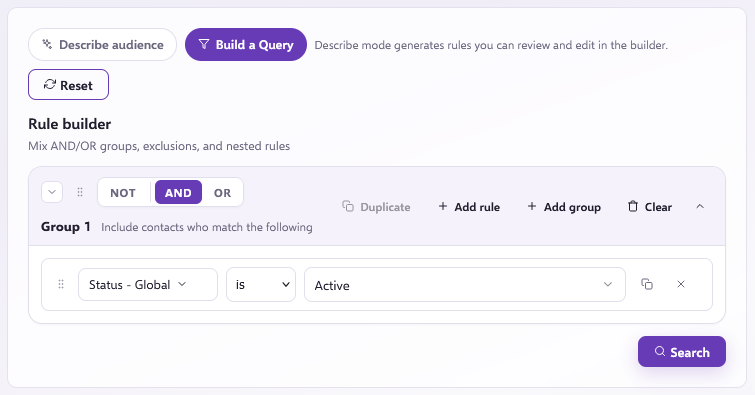
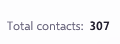
Only the Contacts matched in the search results count as active contacts towards your allowance:

How can I reduce my active contacts?
If you're nearing or going over your limit, there are two main options.
Option 1: Set contacts to Inactive
The best method is to deactivate contacts in bulk by updating their Global/Contact status to Inactive. You can do this yourself. This lets you keep all of the data and reporting in the platform that is tied to these contacts, while the inactive status stops you from actively sending campaigns or Journeys to them.
This option is especially recommended if you have a custom integration between Force24 and your CRM. If you delete contacts instead, Force24 can add the deleted email addresses back through the integration if they haven't also been deleted from your CRM. Keeping the contacts in your account as inactive prevents this, because all of the data is still there, it just isn't active to be sent to.
Want to deactivate contacts?
If you want to do this yourself, learn more in our How to bulk update contact subscriptions and contact status article.
Option 2: Delete contacts
Alternatively, you can ask for contacts to be deleted in bulk from your account. This completely removes the contacts and their data, so they no longer show in Contact Search, reporting and so on. Bulk deletions need to be actioned by our Force24 support team.
Want to request a deletion?
If you want to go ahead, learn more in our How to bulk delete contacts in Force24 article, which explains the full process.
Which option should I choose?
Setting contacts to inactive is the safer choice if you have a CRM integration with Force24. Deleting contacts is usually best if you don't have one.
Need a hand?
If you'd like any further help managing your contact allowance, reach out to us on live chat, using the chat bubble at the bottom right of your Force24 platform. Our team is happy to help.