
In order to find your Account (or Client) ID you would need to go onto the Settings tab when logged into your account. This can be located at the top right hand corner of the screen:
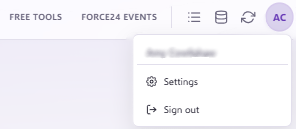
Once on the settings page you can click 'Platform Settings' and then you will be able to see your Account ID at the top of the page, with a quick 'Copy Platform ID' button underneath:

If you have any questions, feel free to reach out to us through the live chat function available bottom right in your Force24 Platform. Our team is ready to assist you and provide support whenever you need it!