Scheduling social media posts is essential for maintaining a consistent online presence. SoAmpli makes this simple, so you can plan and share content with ease. This article is a quick guide to scheduling a post.
New to creating posts?
If you want to find out how to get started with creating your post, learn more in our How to create a post article.
How do I schedule a post?
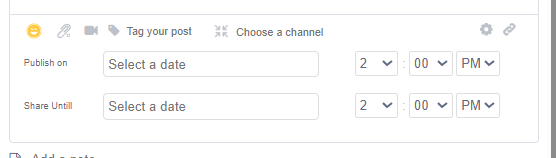
Once you have created the post, click the cog icon shown below:

This gives you the option to pick a date and time to schedule your post for, as well as a date until which other users can share the content. This lets you set a window in which the post is shareable, which is useful for time-sensitive content.
- Publish on: the post is made available for other users to share to their own social channels from this date and time.
- Share Until: the post becomes unavailable for users to share from this date and time.