
You have created your email template, and all looks good to go, but then on your test the line height is mis-aligned. This can happen due to a couple of things such as pasting text from external source, luckily we some fixes for this.
Once in the template, select the snippet you would like to amend, the text box editor will open on the right hand side.
Firstly we recommend using our text cleaner, as sometimes pasting text from an external source can carry over different formats. The article here will explain how to do this How do I clean my text?
After you have used the text cleaner, you will need to follow these steps:
Step 1. On the top row, click on the 'Clear Formatting' button as shown below, this will clear any styling within the text.
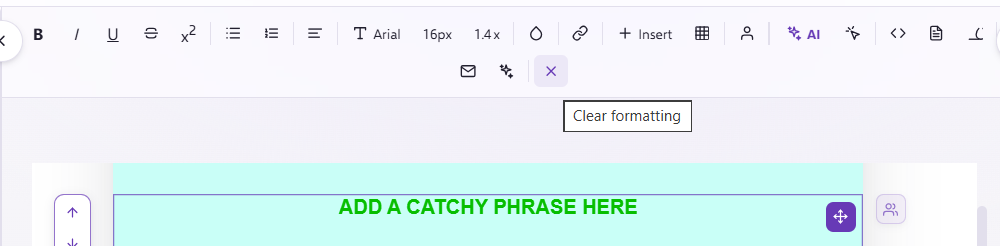
Step 2. You then want to click on 'Line Height' and set this to your preferred unitless value, this will ensure all your line height is uniform throughout the text box.

If you have any questions, feel free to reach out to us through the live chat function available bottom right in your Force24 Platform. Our team is ready to assist you and provide support whenever you need it.